Kamis, 17 Februari 2011

DOWNLOAD KBBI OFFLINE GRATIS

 DOWNLOAD KBBI OFFLINE GRATIS
Setelah beberapa hari mengerjakan kamus ini Alhamdulillah akhirnya KBBI versi offline sudah jadi dan siap rilis. KBBI versi 1.1 ini merupakan versi offline dari KBBI Daring ( edisi III) yang ada di PusatBahasa (http://pusatbahasa.diknas.go.id/kbbi/). Dibanding versi online Kamus ini mempunyai beberapa keunggulan, dan selain itu Kamus ini Gratis (freeware) dan bebas disebarluaskan dengan syarat tidak mengubah software.
Ide untuk membuat kamus versi offline ini muncul ketika melihat situs KBBI tersebut, dan sekalian me-review ulang delphi programming yang sudah agak lama tidak terpakai lagi. Database diambil dari website dengan otomatisasi program yang juga dibuat dengan Delphi 7 personal. KBBI v1.1 ini bersifat portable sehingga tinggal download dan jalankan, tanpa perlu install.

Penggunaan dan Fitur

Sengaja tidak ada petunjuk penggunaan atau file bantuan, karena penggunaannya sangat mudah, tinggal memasukkan kata yang akan dicari dan tekan enter atau klik tombol cari, maka akan ditampilkan arti kata yang dimaksud jika ada.
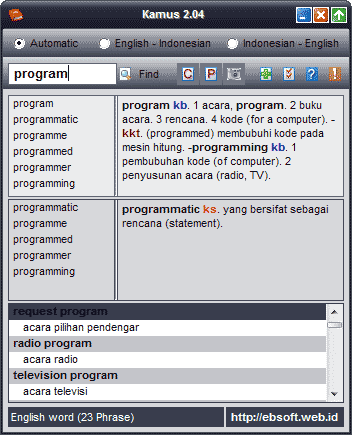
Arti yang ditampilkan sudah di format sedemikian rupa agar memudahkan pengguna membaca dan mencari definisi kata yang dimaksud. Dua kolom sebelah kiri merupakan hasil kata pencarian, dengan penjelasan :
  • Kolom atas merupakan daftar kata yang merupakan kata dasar
  • Kolom kedua merupakan hasil pencarian, tetapi tidak didapatkan pada kata dasar tetapi pada kata turunan atau majemuk ( di istilahkan dengan sub lema kalau tidak salah)
Bagian Kanan merupakan definisi kata yang ditampilkan dengan warna yang memberikan arti sebagai berikut :
  • Warna merah dengan latar kuning adalah lema (kata dasar)
  • Warna merah dengan nomor adalah banyaknya arti aatu definisi kata
  • warna merah saja tanpa latar merupakan sub lema atau kata turunan
  • warna biru adalah jenis kata atau termasuk dalam istilah apa
  • warna hitam adalah arti aau definisi kata
  • warna hijau adalah contoh penggunaan kata dalam kalimat
  • warna ungu adalah contoh dalam peribahasa
  • Warna hitam dengan background hijau merupakan hasil pencarian yang terdapat pada sub-lema atau kata turunan
Jika ada masukan, saran, kesalahan tampilan atau program,silahkan disampaikan. Bagi yang ingin mengupload di (blog/website) tempat lain, diharap untuk tetap mencantumkan link ke ebsoft.web.id atau ke tulisan ini. Semoga KBBI offline ini bisa bermanfaat. Download KBBI v1.1 ( box.net) atau dari link ini KBBI v1.1 (4shared) ukuran sekitar 3.2 MB
Update
Versi 1.1 : Perbaikan file yang dideteksi sebagai virus oleh beberapa Antivirus (Kaspersky, AVira )
DOWNLOAD KBBI OFFLINE GRATIS

DOWNLOAD KAMUS INDONESIA-INGGRIS/ INGGRIS INDONESIA

 DOWNLOAD KAMUS INDONESIA-INGGRIS/ INGGRIS INDONESIA
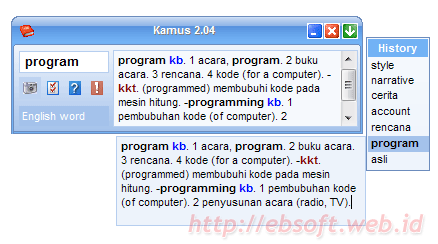
Kamus is an English-Indonesian Dictionary and vice verse. This program is released as freeware for personal and non commercial use. For other uses just email me. Many software dictionaries are available, this one is different from the others, it tries to facilitate the translations and also helps in reading.
Key features of this software are:
  • Small size for easy distribution
  • Simple and easy user interface
  • Fast Search
  • Automatic search between English and Indonesian languages. It will search English-Indonesian First, then if no word was found, it will try to find Indonesian – English. You can select individual languages.
  • Clipboard monitoring. With this feature, the program will translate the text in the clipboard. So you just copy the text you want to translate and then kamus will find the translation in the program’s window. It will automatic remove the non alphabetic ( ‘a’ to ‘z’ ) character such as : !@#$%^&*():”?><,./'; etc
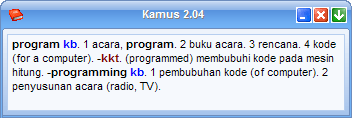
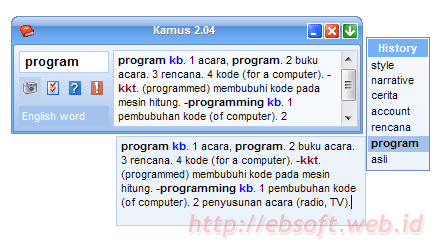
  • Compact Mode, is an additional feature that may be very handy when you need to translate some text while you are reading. It was designed with a small form and only shows the text and the result.
  • Smart Find
  • Auto remove non-letters such as !’,:;.?”-)\(*/+, etc
  • Highlighted result for Indonesian
  • Find exact word, contained in text or Phrases.
  • Adding new word and phrase
  • More than 41.000 English-Indonesian words, 35.000 Indonesian-English words and more than 64.000 phrases.
  • 20 nice skins with optimization
  • Transparency Support ( Win 2k, XP and Up )
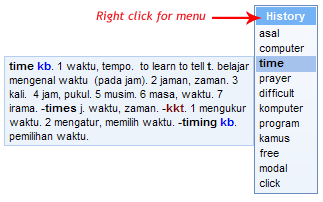
  • History Window, since version 2.04 this feature was introduced. You can quickly select the history search
System Requirements:
  • Windows 9x/ME/NT/XP/2003/Vista/7
  • Pentium II or above with 32 MB RAM.

Screenshot

Download Kamus

Download (select one) :

SOFTWARE UNTUK MENYEMBUNYIKAN FILE

HIDEN FILE TOOL
This is my freeware that maybe useful for you. Small tool and portable to search (very fast) not only hidden files/folder, but also the other attribute, includes system-archive-read only. Plus easy change/set the file/folder attributes. Useful when your files/folders was hidden by virus (mallware), trojan etc.
Key Features :
  • Small size (only about 27 KB 36 KB ) and also portable
  • Search files/folder with Attributes hidden, system, read only or archive. You can use combination of them
  • Custom filter. You can search all files ( default with *;*.* ) or specific file types, for example : *.exe;*.dll;*.pif
  • Easily delete files from list
  • Easily change the attributes of selected files/folder
  • Custom directory search
  • Highlight result for some file extensions
To set/change the attributes, just select files/folders from the list ( you can select more than one using key combination Shift+click or Ctrl+click). Then from the Set Attributes options, check or uncheck to set the attributes. After that, just click APPLY.
Supported Operating System : Windows 9x,2000,XP,Vista and Windows 7
Download (size 36 KB): DOWNLOAD KLIK DISINI ( via box.net) or HiddenFileTool in 4shared or just DOWNLOAD KLIK DISINI ( ebsoft server)